Your alerting solution for public authorities, educational institutions, financial institutions, and businesses.
Our accessible, cross-platform solutions enable more than 500,000 people to carry out their daily work safely. Successfully in use for over 16 years.


500,000+
Protected users
96 %
Satisfied customers
16+
years of experience
Stiller Alarm – Desktop alerting solution
The Stiller Alarm desktop alerting solution provides a platform-independent security solution directly from your desktop PC, laptop, or client. It enables fast, targeted requests for help directly from the workplace. Protection for your employees is also ensured when using mobile devices such as laptops. Within your premises, in the event of a threat, an escalating conversation, a medical emergency, or a hostage situation, the alerting software allows you to discreetly call for immediate assistance or initiate an evacuation.
How the Stiller Alarm alerting solution works — explained simply
In a threatening workplace situation, help can be requested discreetly via the Stiller Alarm software — using a mouse click, keyboard shortcut, or USB alarm button.
The alarm is neither visible nor audible in the office of the person who triggers it, but it appears immediately on the screens of recipients (e.g., colleagues or security personnel). They receive all relevant information in real time, including location and recommended actions.
This fast and targeted response helps actively de-escalate situations and increases the safety of your colleagues.
Example use case: Stiller Alarm desktop PC/client alerting




Request your free trial now!
Test Stiller Alarm free for 90 days — no obligation!
Why institutions and companies choose the Stiller Alarm alerting software

Real-time alerting
Immediate alarm transmission to responders (name, room, time).

Intuitive operation
Alarms are triggered directly from the workflow and are easy to use.

Mobile security
Automatic or manual location tracking for laptops.

High safety with low investment
Significantly increased employee safety with minimal time and cost (no additional hardware required).

Simple and clear administration
Easy setup and adjustments via drag & drop in the Stiller Alarm Portal.

Situation-based control
Alarms are sent according to the specific emergency scenario.
Less fear, more productivity.
Using Stiller Alarm has a significantly positive impact on stress, anxiety, and motivation in the workplace.
82 %
feel safer at work with Stiller Alarm
75 %
Verringerungreduction in stress
96 %
would recommend Stiller Alarm
*Die Daten basieren auf den Ergebnissen der Vor- und Nachbefragung der Kunden von Stiller Alarm.

With the alerting software, you can immediately report and communicate different types of emergencies:

Threat alert

Evacuation measures

Fire alarm

Medical emergency

Company-wide notification system
How to trigger an alarm

You can choose from the following options — or use a combination:
- Keyboard shortcut
- Click on a desktop icon
- Click on the taskbar
- Click on the alarm widget
- Press a USB button (e.g., mounted under the desk)
- Press the mobile alarm transmitter
Our solutions for your safety

Stiller Alarm Standard
For large environments | Includes notification system & alarm simulation

Stiller Alarm Standard + Mobile App
For safety at the desktop workplace & on the go

The Stiller Alarm Desktop Version provides all essential functionalities for an unlimited number of users. Multiple alarms can be triggered and displayed simultaneously. Even with a locked screen, the software retains its full functionality.
All recipients receive the necessary information in real time — including the name, location, and alarm message of the person triggering the alarm, as well as the time of activation. The acknowledgment function optimally supports your internal response process.
Key features at a glance:
- Simple and intuitive operation for both users and administrators (e.g., data import via interface, drag & drop management)
- Support for different alarm types (e.g., threat, fire alarm, evacuation, etc.) with pre-configured messages or flexible text input via the integrated notification system
- Real-time alerting even for unlimited users
- Alarm acknowledgment, escalation to other alarm groups, and low-user alarms
- Trigger and receive alarms even on the lock screen
- Automatic alarm simulation in your environment; floor plans support your planning
- Multi-tenant and domain-capable with flexible roles and permissions
- Platform-independent (Linux, Windows, macOS)
- Optional SMS & email alerting (e.g., for security personnel)
- Mobile operation via laptop or the Telekom mobile alarm transmitter
- Optional integration with automated crisis management
- Optimized for desktop/PC/laptop environments, thin clients via terminal server for Citrix, VMware virtual desktops, VDI/ZeroClients, or mixed environments
- Seamless integration into existing IT infrastructure
- Fast and modern web interface
- Independent of paid servers
- Integration with various hardware components such as USB buttons, mobile alarm transmitters via radio network, fire alarm systems, and the Stiller Alarm Mobile App
- Connection to control centers (24/7)

With the Stiller Alarm Desktop and App bundle, you get the desktop version of Stiller Alarm along with the Stiller Alarm Mobile App.
This solution provides the most comprehensive protection. You and your employees can trigger alerts quickly and efficiently both from the desktop PC/client workstation and on the go — for example, during off-site appointments or on the way to your next meeting.
The bundle also allows field employees to send alarms to colleagues in the office as well as other employees working remotely.
You can find the detailed features of the desktop version under “Key features of the Stiller Alarm Desktop Version” (see above). Additional details on the mobile version are available under Stiller Alarm Mobile App Solution.
Bundle – Key benefits at a glance:
- Comprehensive protection through desktop and mobile alerting (including active and passive alarms)
- Flexible assignment to alarm groups depending on whether a user is in the office or working remotely
- Alerts from mobile devices to desktop devices
- Automatic location tracking, indoors and outdoors
- Central administration of both desktop and mobile versions via a single web-based interface
- Unlimited user scalability
We make it easy for you
Simple setup
Integrate Stiller Alarm seamlessly into your IT environment
Define functions and configure the alarm system
Fully operational within approximately 3 hours
Platform-independent (Linux, Windows, macOS)
On request, we are happy to assist with software installation
Easy support
Our team is available Monday–Friday, 9:00 a.m. – 5:00 p.m., to implement your requirements and tasks
De-escalation training specifically for companies, educational institutions, and public authorities
Creation of a security plan for safe and targeted action in various emergency situations
Training for your employees on using the software
Easy to use
Real-time alerting for unlimited users
One click is enough to ensure your safety
Trigger alerts via the Mobile App or desktop/laptop to colleagues nearby and receive immediate protection
Industries that frequently rely on our comprehensive protection

Public Administration

Healthcare

Education

Utility company

Real Estate

Other industries
All the benefits of Stiller Alarm’s desktop alarm software
Immediately after the silent alarm is triggered, colleagues are alerted via a notification on their screens and can provide assistance. In addition to all essential information such as name, room, and time, the alarm can also be acknowledged or confirmed. The very possibility of triggering an alarm significantly enhances employees’ sense of safety in the workplace.
The software is designed so that employees can easily trigger an alarm even in stressful situations (e.g., USB button, simple keyboard shortcut, or click on a desktop icon). The alarm is triggered directly from the workflow, meaning there is no need to use the phone system. This ensures the call for help is clear while keeping the alert simple and discreet.
Inform your employees selectively about evacuation alerts. With flexible group management and custom text input, you can control which employees should use which escape routes.
Alerts can still be triggered even if the screen is locked or the server goes down!
Work easily and effortlessly from any location — via laptop, the app, or the Telekom mobile alarm transmitter — with full protection.
When an alarm is triggered, the correct procedures are automatically initiated: response teams immediately receive all relevant information, communication channels are set up, and specific action recommendations are sent depending on the type of threat.
Stiller Alarm meets the DIN VDE V 0827 standard and provides comprehensive protection for every end user in accordance with ISO 9241.
The software is designed for use with 15 or more employees and has been successfully deployed across various industries for over 18 years. The number of users can be scaled without limit.
The number of users and available features can be easily expanded at any time. For example, you can also add the “Mobile Working” feature for laptops or integrate the Stiller Alarm Mobile App.
Specifically designed for large organizations with many workstations, Stiller Alarm offers one-click alarm simulation to test your implemented alarm plan. This allows you to immediately see which workstations will be alerted in an emergency and which will not, providing optimal support for planning and ensuring the reliable deployment of the alerting software.
The platform-independent Stiller Alarm software is simple to set up and install. Installation and configuration take only a few minutes. You are guided by a straightforward installation manual and, if needed, personally supported by our team. We can also handle the deployment for you, whether remotely or on-site.
Purchasing and operating the software (on-premises) is very cost-effective. Depending on the number of licenses and additional features required, you pay a one-time license fee plus a proportional subscription (for updates and access to support). Subscriptions are mandatory for the first year and optional thereafter.
You can test the Stiller Alarm software for 90 days free of charge, with all features included.
Changes can be made quickly, intuitively, and easily in the web-based administration portal. For example, end devices can be configured using drag & drop.
The administrator has a clear overview of all triggered alarms (device, time, and alarm type) through the logging function.
The alarm can also be sent via SMS or email, for example to notify security personnel who do not have access to a PC workstation.
Stiller Alarm meets the standards for emergency and hazard systems: DIN VDE V 0827-1 and DIN VDE V 0827-2.
From security planning and de-escalation training to health checks and integration with the control center — your maximum protection is our goal.

Technical information for the Stiller Alarm Desktop software
A quick overview of the technical details for the Stiller Alarm Desktop alerting software:
- High compatibility
- Easy integration
- Flexible system requirements (platform-independent)
- Optimized for desktop/PC/laptop as well as thin clients via terminal server for Citrix, VMware virtual desktops, VDI/ZeroClients, or mixed environments
CITRIX Ready certified - Centralized software distribution
- The standard version requires a server to manage users via a database. Stiller Alarm’s high availability ensures load balancing and guarantees uninterrupted software operation, even if a server fails.
Stiller Alarm Product Video
Request a trial version now!
Try Stiller Alarm for 90 days—free of charge and with no obligation!
Intuitive administration
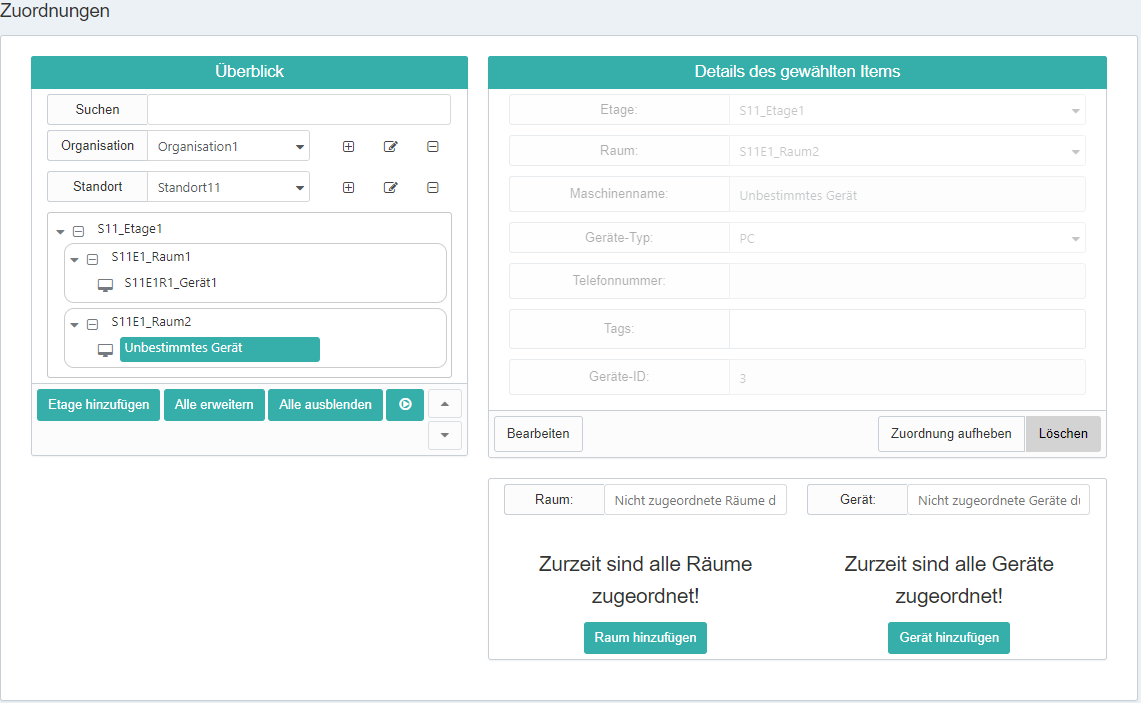
The Stiller Alarm alerting solution is easily managed through a central, web-based administration interface — the Stiller Alarm Portal. As an administrator, you can configure all important settings and make changes in one place. The portal manages both the desktop alerting software and the mobile app, giving administrators a clear overview and allowing them to assign all users within the company efficiently.
Key functions include:
- Definition & adjustments of multiple levels (company, location, floor, alarm group, room) and devices — all via drag & drop
- Alarm simulation — test your alarm plan at the push of a button
- Floor plans — for visual support
- Logging function — overview of all alarms sent within the company
- Feature management — activate additional functions, e.g., low-user alarms, alarm acknowledgment, or alarm cancellation
- Extensions — add users and functionalities (e.g., fire alarm systems)
You can also explore our tutorial videos for the Stiller Alarm Portal, which demonstrate how intuitively the portal allows you to set up and manage your entire alerting system.
Optional extensions

Alarm button (button or switches via USB) often give employees an added sense of security when using the system.
Mobile alarm transmitters are provided by Deutsche Telekom GmbH and use the mobile network to send alerts. This ensures full protection even without a PC or client device.

Automated crisis management allows the appropriate procedures to be triggered automatically via the alert system: response teams immediately receive all relevant information, communication channels are set up, and — depending on the type of threat — specific action recommendations are delivered.
Our technical features at a glance
High compatibility
- Stiller Alarm is based on Microsoft .NET CORE and is suitable for any application environment.
- Optimized for all Microsoft and CITRIX terminal server environments.
- Compatible with all Microsoft Windows versions.
Easy integration
- Seamless integration into existing IT infrastructure — no costly adjustments or extensions required.
- Active Directory user management is supported, allowing easy integration of existing network user groups.
Optimized for terminal servers
- Optimized alert distribution: alarms are first collected by a terminal server service and then distributed to individual sessions.
- This reduces network load and improves system performance.
- The program logic for service and client works the same on both fat and thin clients, with hardware being the only difference.
Flexible system requirements
- All client Windows operating systems with .NET Framework 4.5 or higher (including Windows 8) are supported.
- Server Windows operating systems with .NET Framework 4.7 (from Windows Server 2012 onward) are supported.